
Douyin Video Downloader
 Free to use
 No signup
 MP4 + MP3
How to Download
Douyin Videos
Save your favorite Douyin videos in a few simple steps.
- 1
Copy the video link
Open a public Douyin video and copy its share link.
- 2
Paste into DouyinDrop
Paste the link above and select Download.
- 3
Check the preview and save
Choose MP4 video or convert to MP3.


More about copying a Douyin link
Copy the video link
Open the video in Douyin and tap Share, then Copy Link. On a computer, open the individual video and copy its address from your browser. Choose a public video rather than a profile, search page, or live stream.
Paste it into DouyinDrop
Add the link to the input box above and select Download. If Douyin copied a message containing Chinese text alongside the URL, you can paste the whole message. The tool looks for the video link within it.
Check the preview and save
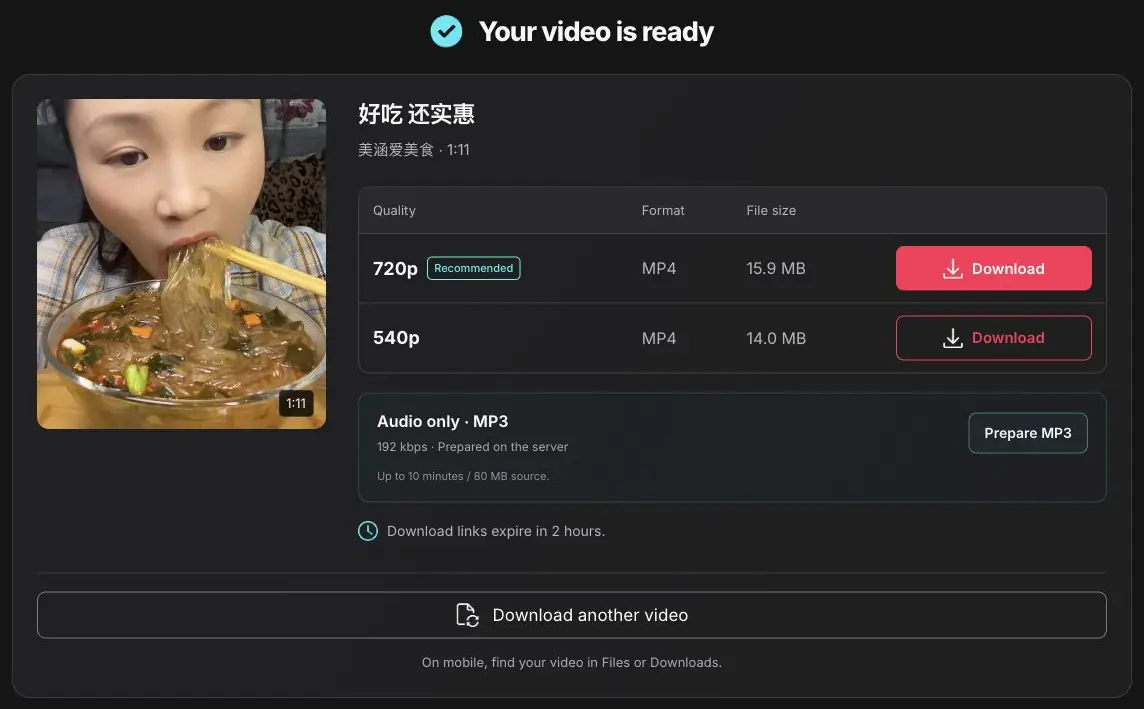
When the video is available, you’ll see its cover, title, creator, and duration. Check that it’s the right clip, then choose a download option. The MP4 will save through your browser; its location depends on your device’s download settings.
Download Douyin Videos Without Watermark
Save the source MP4 when Douyin makes a watermark-free version available.
- No screen recording
- No added DouyinDrop branding
What about logos already in a video?
DouyinDrop looks for the source video that Douyin makes publicly available. When that source has no platform watermark, the saved file won’t include one either. There’s no screen recording or extra DouyinDrop branding added to your download.
There is one distinction worth knowing: a logo, caption, or username already embedded in the uploaded video stays in the file. This tool doesn’t crop the picture or edit those elements out. You can save an available source file, but you can’t use the downloader to erase a creator’s own branding.
Choose Your Video Quality
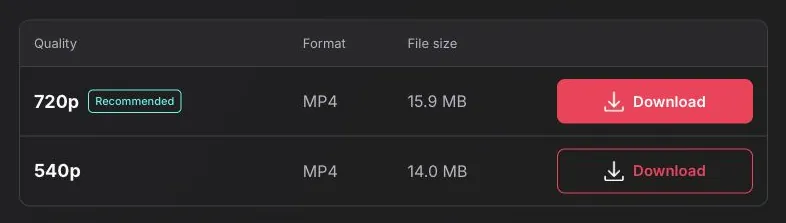
Compare the available MP4 options before you save.

More detail
Choose a higher resolution for a larger screen.

Smaller download
Save space with a smaller available file.
What determines the available quality?
A higher resolution gives you more detail, while a smaller file takes up less storage. DouyinDrop lists the compatible MP4 options available for each video, with resolution labels and file sizes where supplied.
For example, one clip may offer 1080p, 720p, and 540p, while another has only one option. Choose the higher resolution for a larger screen or editing work. A smaller version may be enough for a quick reference on your phone.
The downloader doesn’t upscale videos. If the available source is 720p, selecting a download won’t turn it into a genuine 1080p or 4K file. Quality always depends on the original upload and the versions Douyin makes accessible.
Make Sure It’s the Right Video
Check the preview before downloading.
Cover image
A still image from the video.
Original title & creator
Make sure this matches your video.
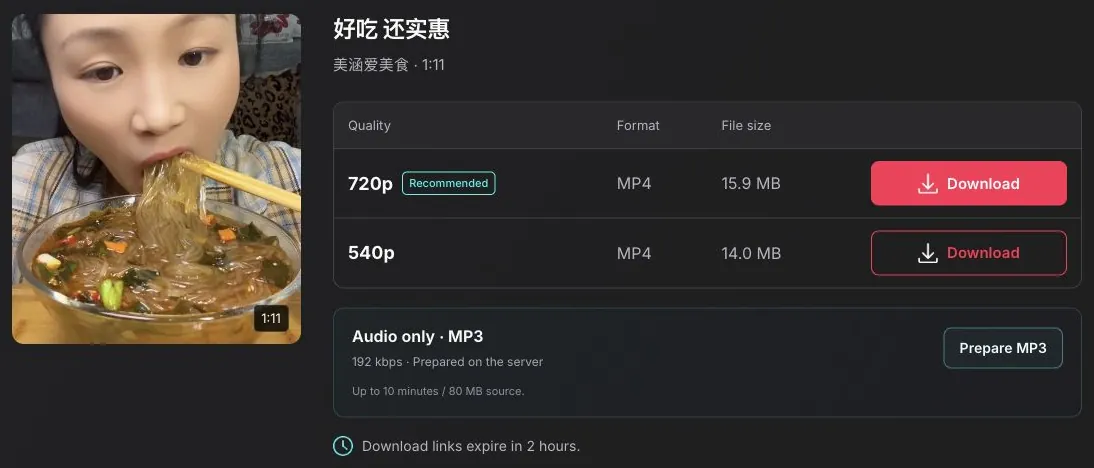

Video duration
Check the length of the clip.
File size
Compare the download sizes.
The cover is a still image. Play the saved MP4 to watch the video.
Why check these details?
Copied several links and forgotten which one is which? Use the result’s cover image and title to identify the clip before saving it. The creator name helps when similar videos appear in your feed, and the duration tells you whether you’ve found the short clip or the longer version.
The cover is a still image, not a playback preview. Once the file is saved, open it in your usual video player to watch it.
File size is useful if you’re downloading over mobile data or running short of storage. Where a size is shown, compare the options before choosing. A higher resolution isn’t always necessary: for following a recipe or checking a single step in a tutorial, a smaller download may do the job.
Paste the Link
You Already Have
DouyinDrop works with short links, full video URLs, or copied share messages.
Short share link
Full video URL

Copied share message
Public videos only. Profiles, photo albums, live streams and private posts aren’t supported.
More supported link formats
Use a link to an individual public video. Supported inputs include:
- Short share links beginning with v.douyin.com.
- Full video addresses containing douyin.com/video/.
- Supported iesdouyin.com video share links.
- A copied share message that includes a video URL.
You don’t need to remove the surrounding share text before pasting. If the short link fails, open the video in a browser and try its full address instead.
This page downloads individual videos and can convert their audio to MP3. Profile downloads, photo albums, live streams, and private posts aren’t currently supported.
Save It on Your Device
- 1
Open DouyinDrop in Safari
- 2
Paste the link and choose an MP4
- 3
Find your video in Files → Downloads
Want the video in Photos?
Open DouyinDrop in Safari, paste the copied link, and choose an available MP4. Confirm the download if Safari asks. When it finishes, check the browser’s download list or the Downloads folder in the Files app.
If you want the clip in Photos, open the downloaded file and look for the share menu’s Save Video option. That option depends on the file and your device.
- 1
Open DouyinDrop in your browser
- 2
Paste the link and choose an MP4
- 3
Find your video in Downloads

More download guidance
Use Chrome or another current browser. Paste the Douyin link, open the result, and tap the quality you want. You may be asked to confirm the filename or download location.
Check your browser’s Downloads list or your phone’s file manager afterward. The file may also appear in your gallery, depending on how your phone organises downloaded media.
- 1
Open DouyinDrop in your browser
- 2
Paste the link and choose an MP4
- 3
Save the MP4 to your preferred folder
More download guidance
Open the tool in your browser and paste the video URL. Choose a download option, then save the file to your preferred folder. If you haven’t changed your browser settings, check Downloads first. MP4 files can be opened in most common video players.
Your browser controls where the file is saved.
Having Trouble
Downloading?
Start with these quick checks.
Check the video link
Start by checking the link. Open it in Douyin and confirm that it still leads to a public video. A deleted post, a private clip, or a link to a profile won’t produce a downloadable video here.
The video won’t load
If the link works but the tool can’t fetch it, try again later. Douyin can temporarily block requests or make some videos unavailable in particular regions. Repeatedly pressing Download usually won’t resolve that kind of restriction.
My download link expired
Already have a result, but the file link stopped working? Download links expire after 2 hours. Paste the original Douyin URL again to generate fresh options.
The download was interrupted
If you see a request-limit message, wait a minute before retrying. For an interrupted file transfer, check your connection and available storage, then try downloading again.
Download links expire after 2 hours.
A Few More Questions
Useful answers before you save a video.
Is this Douyin video downloader free?
Yes. You can look up a supported public video and save an available MP4 without paying or creating an account. Basic request limits help keep the service available when several people are using it.
Do I need to sign in to Douyin?
You don’t need to enter your Douyin login details into DouyinDrop. The tool works with supported public links. A video that requires private-account access isn’t supported.
Can I download just the audio as MP3?
Yes. After fetching a video, choose Prepare MP3 in the audio section. Cloudflare converts the source audio into a 192 kbps MP3. When it is ready, choose Download MP3. Your device only downloads the finished audio file. This option supports source videos up to 10 minutes and 80 MB.
Does it work with TikTok links?
This tool is for Douyin links. TikTok URLs aren’t supported here, even though the two platforms have similar-looking video interfaces. Copy the link from the Douyin post you want to save.
Where will my downloaded video appear?
Start with your browser’s Downloads list. On a computer, check the Downloads folder; on iPhone, check Files. Android users can also look in their file manager. Saving a file doesn’t always add it to the photo gallery automatically.
Can I download someone else’s video?
Only save content you own or have permission to download. A publicly accessible post doesn’t automatically give you permission to repost, sell, or use it commercially. Keep the creator’s rights in mind before sharing a saved copy.